AI-powered gym tracker

Train Smarter.
Track Everything.

Gymo logs every rep, set, and kilogram in real time, builds your training plan with AI, and tells you exactly when it's time to add more weight.
3,000+EXERCISES IN THE LIBRARY
LiveAPPLE WATCH & LOCK SCREEN SYNC
iOS 26+BUILT FOR IPHONE
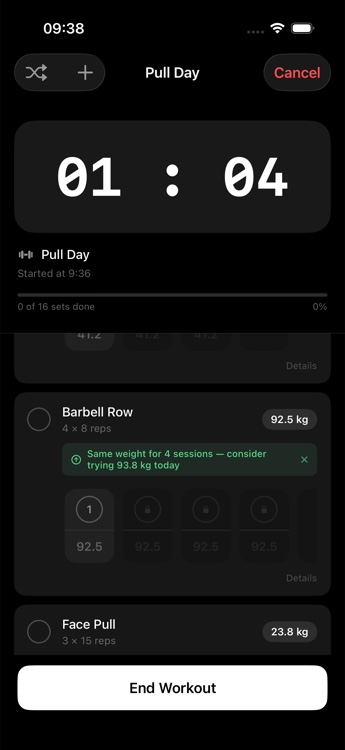
Gymo active workout session showing a progressive overload weight suggestion
+1.2 kg PR
99 BPM avg
606 kcal
App preview

See Gymo in action.

Real screens from a real training session — no mockups.

Gymo active session with a progressive overload suggestion
Live session

Weight per set, a rest timer, and AI overload suggestions mid-workout
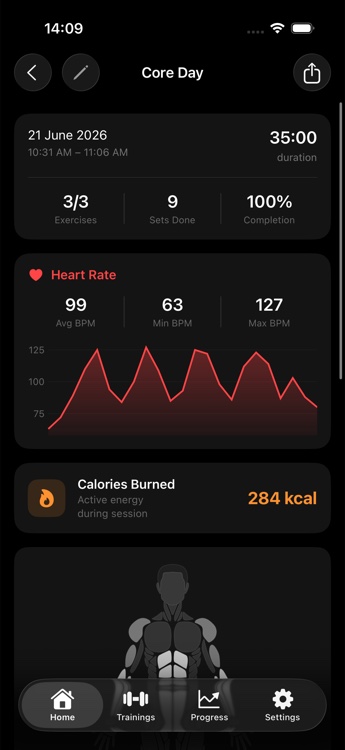
Gymo finished workout summary with heart rate and calories
Session recap

Heart rate, calories, and completion the moment you finish
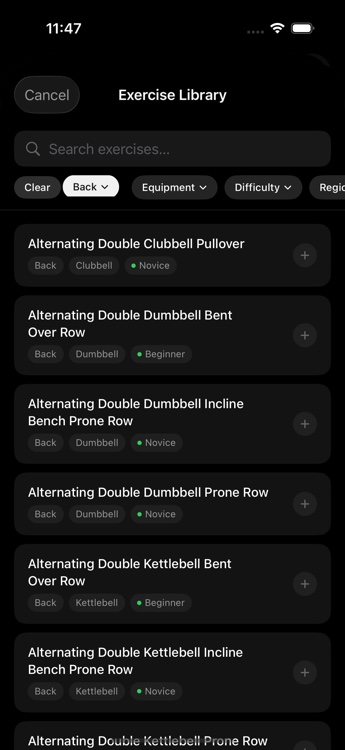
Gymo exercise library with filters for muscle, equipment, and difficulty
Library

3,000+ exercises with filters for muscle, equipment, and difficulty

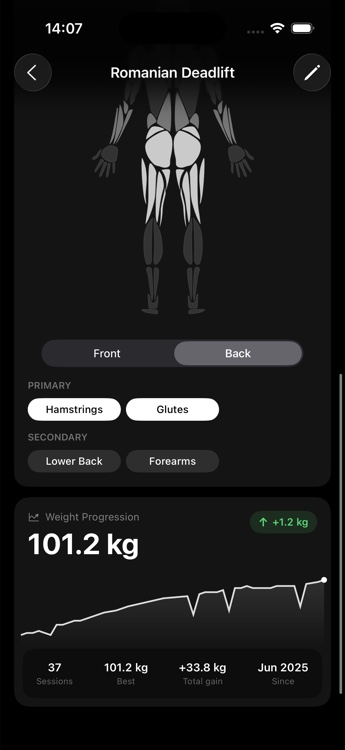
Gymo exercise detail showing primary and secondary muscles and weight progression
Exercise detail

Primary and secondary muscles mapped to every movement
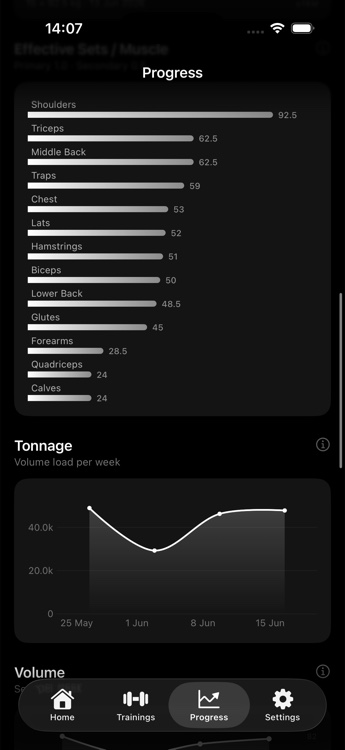
Gymo progress screen with effective sets per muscle and weekly tonnage
Progress

Effective sets per muscle group and weekly tonnage, at a glance
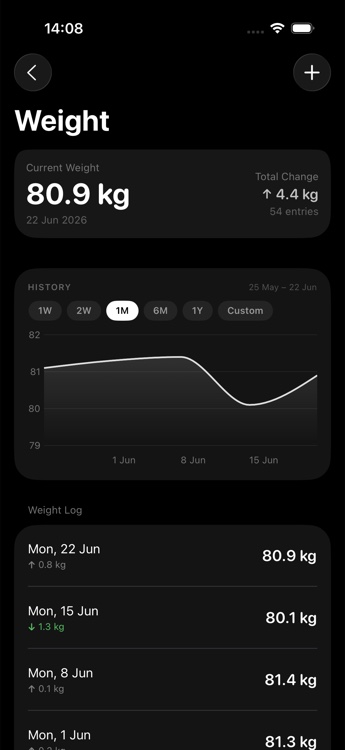
Gymo body weight tracking screen with a trend chart
Body weight

Log weigh-ins and watch the trend, not just the number
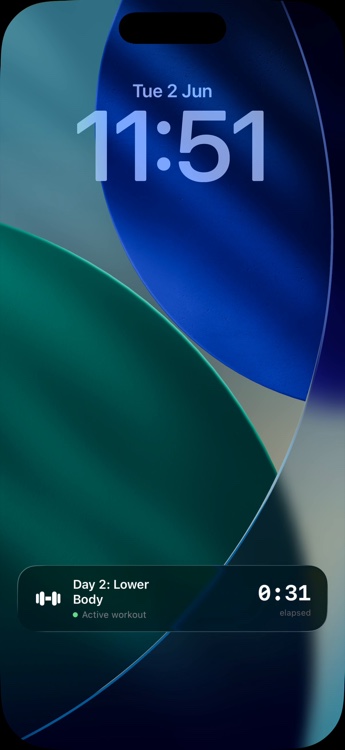
Gymo Live Activity on the iPhone Lock Screen showing an active workout
Live Activity

Your set, rest timer, and elapsed time — right on the Lock Screen
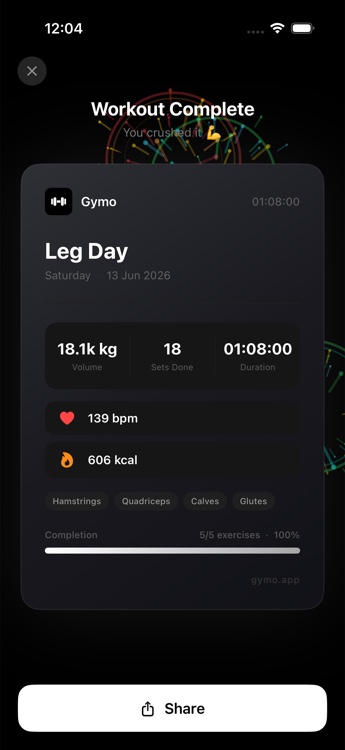
Gymo shareable workout summary card
Share card

Turn a finished workout into a shareable summary card

Why Gymo

Everything you need to actually keep training.

A tracker only helps if it keeps up with the workout. Every feature below is built to survive a busy gym floor.

AI-Powered Training Plans

Answer a few questions about your goals and equipment, and Gymo builds a full weekly split around them — regenerate anytime.

Progressive Overload Coach

Gymo watches your working weight across sessions and tells you the exact day it's time to add another kilogram.

3,000+ Exercise Library

Every movement ships with step-by-step photos and a muscle diagram showing exactly what it trains.

Apple Watch & Live Activities

Heart rate, active calories, and your current set — synced to your wrist and Lock Screen automatically.

Under the hood

Plan it, train it, watch it climb.

Gymo is built around one loop: build a plan, log the session without slowing down, and turn every set into a trend you can see.

1

Build your plan

Let AI generate a split from your goals and equipment, or build one exercise at a time — then assign training days to your week.

2

Train, set by set

Sets unlock in order, weight is tracked per set, and a rest timer keeps pace — mirrored live to your Apple Watch and Lock Screen.

3

Watch the trend

Every session feeds muscle-volume charts, tonnage trends, and per-exercise weight progression — progress you can see, not guess at.
Your next PR starts with one tap.

Free to start. AI plans, overload coaching, and Apple Watch sync included.

About Gymo

A dumbbell and a straight line, because that's the whole idea.

The icon is the plan: put in the reps, watch the line go up. Gymo exists to close the gap between training hard and training smart — without turning every set into data entry.

Gymo app icon
The problem

Logging a workout shouldn't be harder than doing it

Spreadsheets, sticky notes, and generic templates all cost more effort than they give back. Most tracking apps optimize for logging everything; we optimized for the thing lifters actually do mid-set: mark it done and keep moving.

The approach

Let the app coach, not just count

Gymo turns your training history into weight recommendations, maps every exercise to the muscles it actually trains, and mirrors your live session to your Apple Watch and Lock Screen — so the phone can stay in your bag between sets.

The team

Small, independent, and lifting the same weights

Gymo is built by an independent developer who trains with it every week — every rest timer, overload suggestion, and muscle chart shipped because it was needed in the gym first.

What we optimize for

Four things we won't compromise on.

Speed

Fewer taps, more reps

Sequential sets, per-set weight, and a rest timer that starts itself — logging should never slow down a session.

Accuracy

Muscle-accurate, not generic

3,000+ exercises are mapped to real primary and secondary muscles, not one vague category.

Privacy

Your training data stays yours

Health and workout data live in Apple Health and on your device — nothing is sold, and AI plan requests carry no personal identifiers.

Progress

Every screen ties to a trend

Tonnage, muscle volume, and per-exercise weight progression turn a logged set into a line that's actually going somewhere.

Built by someone who trains, for people who train.

Free to download, ready before your next session.

Support

How can we help?

Answers to what we hear most. Can't find it here — email us directly.

Is Gymo free?
Yes — logging workouts, the exercise library, and progress charts are free. Gym Rat, the optional subscription, unlocks AI-generated plans, unlimited custom exercises, the rest timer & Live Activity, data export, and removes ads.
How does the AI training plan work?
Tell Gymo your goals, available equipment, and weekly schedule — during onboarding or anytime in Settings — and it generates a full split for you. Regenerate as often as you like; nothing about your identity is included in the request.
Does Gymo work with Apple Watch?
Yes. Install the companion Watch app to see your current exercise, set, and rest timer on your wrist, and Gymo can read your heart rate straight from the workout.
What happens to my Apple Health data?
With your permission, Gymo reads heart rate and writes completed workouts and active energy to the Health app. That data stays in Apple Health and on your device — Gymo doesn't run a server to store it.
How does the overload recommendation work?
Gymo looks at the weight you've used for an exercise across recent sessions, and when it's stayed flat for a few sessions in a row, it suggests a small increase — right inside the active session.
Can I switch between kg and lbs?
Anytime, in Settings. Every weight is stored in kilograms internally and converted automatically, so switching units never changes your history.

Email support

For bugs, billing, or anything account-related. We reply within one business day.

yevhen.basistyi@gmail.com

Feature requests

Tell us what's missing — the overload coach and Live Activity both started as requests.

yevhen.basistyi@gmail.com

Status & known issues

Nothing broken right now. If something feels off, email support first — we'll confirm before it's posted anywhere public.

Still the fastest way to log a set.

Get Gymo free on the App Store.